How AI Bots Actually Reach Your Website?
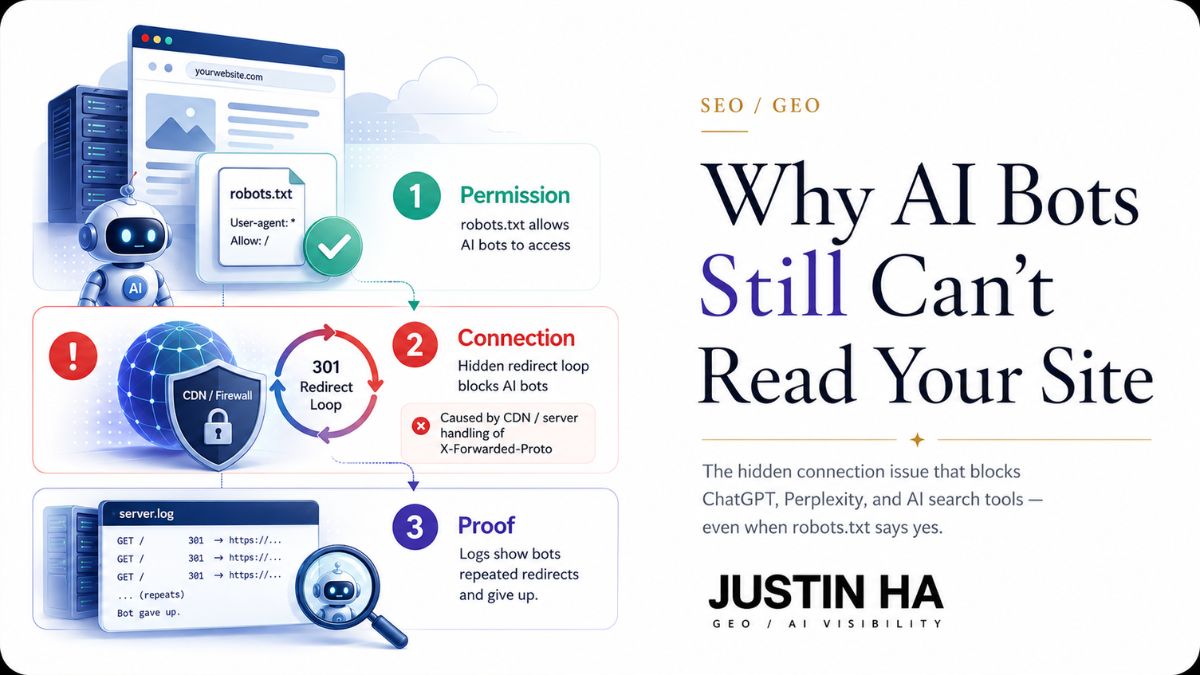






- Passing normal SEO/browser checks doesn't mean AI bots can reach you. Standard tests return "200 OK" even when a real AI bot would be blocked, because they never send the same request a bot sends.
- There are 4 layers a bot must clear, not just robots.txt: Permission, Connection, Rendering, and Proof. Robots.txt only proves permission the other three are where most failures actually happen.
- Most major AI crawlers (GPTBot, ClaudeBot, OAI-SearchBot, PerplexityBot) don't execute JavaScript. A JS-heavy site can rank perfectly on Google while showing these bots a completely blank page.
- 9 things can silently block a bot at the connection layer even when robots.txt allows it: misconfigured proxy headers, CDN bot-management defaults, TLS fingerprinting, rate limits, IP/ASN blocking, geo-restrictions, JS/CAPTCHA challenges, DNS misconfiguration, and server timeouts.
- Server logs are the only real proof a bot actually visited and got content. Everything else (curl tests, browser checks) only shows what could happen — logs show what did happen, and are the strongest way to confirm the problem.
A website can look perfect. It loads fast. It passes every SEO check. And it can still be invisible to AI tools like ChatGPT or Perplexity. The reason is rarely the content. The reason is a handful of technical steps that most checks never test.
What Is an AI Bot?
An AI bot is a program that visits a website to read its content. Tools like ChatGPT, Perplexity, and Google AI Overviews use these bots to collect information before they answer a question. ChatGPT alone runs several separate bots with different jobs, see the full breakdown of GPTBot, OAI-SearchBot, and the other OpenAI bots for exactly what each one does.
These bots work in four steps, not three. First, they check if they have permission to visit. Second, they try to connect to the server. Third, they read whatever the server hands back, without running any code to build the page further. Fourth, that visit needs to actually show up somewhere verifiable. If any step fails, the content never becomes part of an AI answer.
Three Types of AI Bots: Training, Search, and Agent
Not all AI bots do the same job, and by 2026 the field has split into three practical groups instead of two. This matters because blocking the wrong one can hurt visibility instead of protecting it.
| Bot type | Examples | Effect of blocking |
|---|---|---|
| Training bots | GPTBot, ClaudeBot, Google-Extended | Does not remove a site from current AI answers, only affects future model training |
| Search and retrieval bots | OAI-SearchBot, ChatGPT-User, Claude-SearchBot, PerplexityBot | Removes a site from AI answers immediately |
| Agent bots | Assistants that click through a booking flow or complete a task live | Behaves like a real visitor; several major CDNs now give it its own default rules |
Many site owners still block “AI bots” as one single group, without knowing the difference between these three. That single decision can quietly remove a brand from AI-generated answers while the owner believes they only opted out of AI training.
Permission Is Only Step One
Most people stop checking after step one. They look at a file called robots.txt. This file tells bots which pages they can visit.
But robots.txt is just a rule on paper. It does not prove that a bot can actually reach the server, and it does not tell AI systems what the content actually means. That second job is handled by files like llms.txt. Many websites give AI bots permission in robots.txt but still block them somewhere else entirely, which is where most of the real damage happens.
The Four Layers That Really Matter
To know if an AI bot can truly reach and use content, four separate layers need checking:
- Permission. Does robots.txt allow the bot?
- Connection. Can the bot get through the server, firewall, CDN, and network security rules?
- Rendering. Does the content the bot receives already contain the actual text, or does it only appear after JavaScript runs?
- Proof. Do server logs show that the bot actually visited and received a real page?
A website can pass layer one and still fail every layer after it. Connection and rendering are the two layers most teams never check at all.
Why “Allowed” Does Not Mean “Successful”
Here is the problem. A firewall, CDN, or bot management service can block a bot even when robots.txt says “yes.”
This happens because these systems do not read robots.txt. They make their own decisions, based on rules about traffic patterns, request behavior, and security risk. A bot can have full permission in writing and still get rejected at the network layer, seconds later, for reasons that have nothing to do with content policy.
This is not a rare edge case. One major CDN provider, which sits in front of roughly one-fifth of all websites, began blocking known AI bots by default for new domains in mid-2025. Starting September 15, 2026, that same provider is setting new default rules that block Training and Agent bots on any page that shows ads, while Search bots stay allowed. That single setting decides whether millions of sites are visible to AI tools, often without the site owner ever changing anything themselves.
The Connection Layer Checklist: Nine Things That Can Silently Block a Bot
Most guides stop at robots.txt and call it done. The connection layer is where AI visibility actually dies, and it fails in more than one way. If a site sits behind any CDN, firewall, or reverse proxy, work through this list before assuming the problem is content quality.
- Reverse proxy header handling. A server needs to trust and correctly read headers a CDN adds, such as the protocol and origin IP passed along with each request. Get this wrong and a normal request can loop between “secure” and “insecure” versions of the same page forever, a classic cause of a “too many redirects” error that a human browser rarely triggers but a bot connecting through a proxy hits constantly.
- Bot management default rules. Most major CDNs now ship with AI bot categories pre-defined, and increasingly pre-blocked by default for new or unconfigured sites. A rule never touched may already be rejecting GPTBot or PerplexityBot before content is ever read.
- TLS fingerprint filtering. Security systems increasingly inspect the handshake a client makes before any page is even requested, comparing it against known browser signatures. A crawler with a legitimate purpose can still get flagged here if its underlying HTTP library produces a handshake that looks unfamiliar to the filter.
- Rate limiting tuned for humans. Thresholds built around normal browsing speed can flag a crawler making several requests in quick succession as abusive traffic, especially on smaller hosting plans with aggressive default limits, exactly the pattern covered in how AI bot crawl budget actually works.
- IP and ASN blocking. Many AI bots crawl from known datacenter IP ranges. Generic “block datacenter traffic” or “block VPN and hosting IPs” security rules, common in hosting-provider firewalls, can catch legitimate AI crawlers along with real threats.
- Geo-restrictions. If a hosting or CDN setup blocks or challenges traffic from certain countries or regions for security reasons, and a bot’s crawling infrastructure happens to route through one of those regions, the block applies regardless of the bot’s intent.
- JavaScript challenge pages and CAPTCHA gates. A challenge page that asks a browser to run a script before granting access is invisible-proof by design for most AI crawlers, since they generally cannot execute that script or solve that challenge. The bot receives the challenge page itself instead of the content, and moves on.
- DNS and origin misconfiguration. An expired proxy record, a CDN pointing at the wrong origin server, or a stale DNS entry after a hosting migration can quietly send bot traffic to a dead endpoint while the site still loads fine for human visitors on a cached version.
- Server timeouts and resource limits. Shared hosting plans often cap how long a single request can run or how many concurrent connections are allowed. A bot that connects during a traffic spike, or that requests a slow, database-heavy page, can be cut off mid-response.
Any one of these can produce the exact same symptom: the website looks fine to a human, and looks broken or absent to a bot. A browser test shows “200 OK.” A standard SEO tool test shows “200 OK.” None of them send the same request a real AI bot sends, so none of them catch what the bot actually experiences.
The Rendering Layer: A Blank Page Is Still a Blocked Page
Even after a bot connects successfully, it still needs to read something useful. This is where the fourth layer, rendering, becomes its own separate failure point.
Most AI crawlers, including GPTBot, OAI-SearchBot, ClaudeBot, and PerplexityBot, do not execute JavaScript. They request a page once, read the raw HTML that comes back in that first response, and move on. They do not wait for scripts to run, and they do not build the page the way a browser does. If main content is injected by JavaScript after the initial page load, a common setup for sites built as single-page applications, these bots receive an empty shell.
This is a separate problem from the connection checklist above. A page can pass every connection test, return a clean 200 status, and still hand the bot nothing to read. Google eventually renders JavaScript through a second processing pass, so a site can rank normally in Google Search while remaining functionally blank to every major AI answer engine at the same time.
How to Test Your Own Website
Deep technical skill isn’t required to check the basics. Ask a developer or hosting provider to run these checks:
curl -I https://yourdomain.com/robots.txt
curl -I -A "GPTBot" https://yourdomain.com/
curl -I -A "GPTBot" https://yourdomain.com/robots.txt
The first two commands should return 200. If a request using an AI bot’s user agent returns a 403, a redirect loop, or a CAPTCHA challenge page while a normal browser request succeeds, the block is happening at the connection layer, not in robots.txt.
To check the rendering layer, open any important page and view its raw source, not the rendered page in a browser’s inspector. Search for a sentence of the main content. If it is not in the raw source, an AI crawler cannot read it either, regardless of how the connection layer behaves.
If a site sits behind a CDN, also check the AI bot traffic settings in the CDN dashboard directly. Many providers now default to blocking or challenging AI bots, and that setting will not show up in a simple curl test if the block happens through a rule never written directly.
How This Affects Your GEO Performance
GEO performance means how often AI tools find, read, and mention content. A hidden connection or rendering problem hurts every part of this, even with excellent writing.
Here is what happens step by step:
- No visits, no data. If bots cannot connect, they never collect the content. The site is missing from the AI system’s source material.
- No mentions, no citations. AI tools can only quote or link to pages they have actually read. A blocked or blank site cannot appear in an answer, no matter how relevant it is.
- Wasted content effort. Teams often improve structure, add data, and update pages to boost GEO scores. None of that work counts if the bot never reaches the page or receives an empty shell.
- A false sense of progress. Traffic from human visitors and Google Search can stay normal. This hides the problem, because the usual metrics still look healthy.
The stakes are higher than most teams realize. Being cited in an AI-generated answer is now measurably valuable: industry research shows that pages cited in AI Overviews earn roughly a third more organic clicks than pages that are not cited. Other research shows that content backed by clear statistics and citations gets 30 to 40 percent more visibility in AI answers. None of that upside is reachable if the bot cannot connect or cannot read the page in the first place.
In short, this kind of access problem does not lower a GEO score. It removes a site from the process completely, before scoring even starts.
Proving the Problem With Real Log Data
Testing with curl commands and viewing raw source tells you if a block or a blank page can happen. The real proof is in server logs, since logs show what actually happened, not just what should happen, the same evidence trail covered in what an SEO log file actually shows.
If you want to check this directly, run your logs through a log file analysis tool built for this exact purpose.
The AI Log File Analyzer reads server logs and shows: which AI bots actually visited the site, how many requests ended in a redirect, a challenge page, or an error instead of a successful page load, and whether visits dropped after a hosting change, a new firewall rule, or a CDN update. This is the strongest way to confirm access, since it removes guesswork and shows real bot behavior over time.
Why This Matters for Your Business
When someone asks an AI tool a question, the answer comes from websites the AI could actually read. If a site blocks bots or hides content behind JavaScript without knowing it, that content never becomes part of the answer. It does not matter how good the writing is.
This is also why some businesses publish strong content for months and still don’t see better AI visibility. The content is not the issue. The bot never reached it, or never saw more than an empty page.
The traffic this affects is small today but growing fast. Multiple industry reports tracking millions of website sessions show AI-referred traffic climbing by triple and even quadruple-digit percentages year over year, and several studies report that visitors arriving from AI answers convert noticeably better than average organic visitors. A blocked site does not just lose visibility today. It loses a channel that is growing every quarter.
Common Mistakes Teams Make
- Checking only robots.txt. This proves permission, not actual access.
- Assuming Google access means AI access. Googlebot and AI-specific bots are controlled by different rules, use different infrastructure, and can be blocked independently of each other.
- Ignoring CDN, firewall, and rate-limit rules. These sit closer to the server than robots.txt and can override it completely, often through settings the team never configured directly.
- Building for browsers only. A site that depends on client-side JavaScript to display its main content can rank fine on Google while staying invisible to every major AI crawler.
- Never checking server logs. Without logs, there is no real proof that any bot ever completed a successful visit and received actual content.
- Assuming crawl access guarantees citations. Being reachable is the starting point, not the finish line. Content still needs to be clear, well-structured, and trustworthy to get cited, the exact gap covered in why AI crawls a site but never cites it.
Need Your AI Access Checked? Work With Justin Hà
Justin Hà is a Senior Global SEO & GEO Specialist based in Ho Chi Minh City, with 5+ years in SEO and 2+ years focused on GEO. Justin is one of the first GEO specialists in Vietnam with documented AI visibility results, having completed 30+ projects across 9 countries, with results like 80% AI visibility in 3 months and 784% growth in direct bookings for hospitality clients.
If a hidden access, connection, or rendering problem like this is blocking content from AI answers, Justin’s GEO & AI Branding service covers the full process: technical access checks across all four layers, schema and structured data, AI-optimized content, and monthly AI visibility reporting across ChatGPT, Perplexity, AI Overview, and Gemini. Get in touch to start with a free AI visibility check.