How to Read AI Bot Crawl Budget in Your SEO Log File?
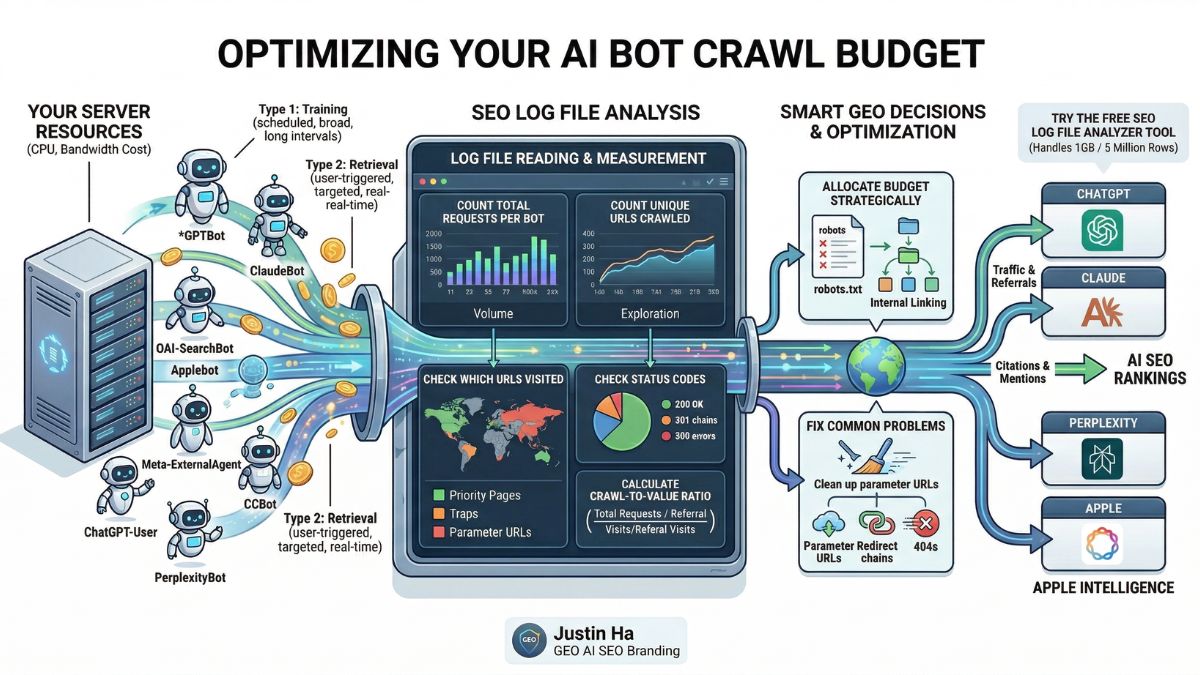






- AI bot crawl budget covers every AI crawler hitting a site, not just Googlebot: GPTBot, OAI-SearchBot, ClaudeBot, Applebot, meta-externalagent, Bingbot, and more, each with its own budget and return.
- AI and crawler bots made up 16.9% of all site traffic in a 48-day study (early 2026), a real server cost in bandwidth and CPU.
- There are 2 types of AI bots: training/indexing crawlers (GPTBot, ClaudeBot, scheduled, indirect long-term value) and retrieval/user-triggered bots (OAI-SearchBot, ChatGPT-User, PerplexityBot, tied to real human intent, much higher value per crawl).
- The key metric is the crawl-to-referral ratio (total bot requests / referral visits): GPTBot runs around 1,276:1, some bots exceed 10,000:1, use this to decide how much crawl budget each bot deserves before blocking anything.
- Bot-specific behavior varies a lot: GPTBot crawls in short intense bursts (114 requests/min observed), OAI-SearchBot checks robots.txt constantly, ClaudeBot is sitemap-first, Applebot is the only major AI bot that renders JavaScript.
- The 6 most common crawl budget wastes: parameter URLs, missed key content sections, redirect chains, 404s from dead external links, JS-rendered content invisible to most bots, and low-value pages (tags, archives) eating budget.
- A monthly review checklist plus a free tool (up to 1GB / 5M rows) replaces manual log parsing and the 99€/year Screaming Frog Log File Analyser.
A server spends real resources on every bot that visits. Some of those bots send traffic, citations, and AI visibility back. Others crawl thousands of pages and send nothing back. An SEO log file is the only place to see exactly what is happening and make smart decisions about it.
This guide explains what AI bot crawl budget is, how to read it in a log file, and how to use that data to improve visibility across ChatGPT, Claude, Perplexity, and every other major AI platform in 2026.
What Is AI Bot Crawl Budget?
Crawl budget is the number of pages a bot crawls on a site within a given time period. For traditional SEO, it refers to how many pages Googlebot crawls per day. For GEO in 2026, crawl budget covers every AI bot that visits a site: GPTBot, OAI-SearchBot, ClaudeBot, Applebot, meta-externalagent, Bingbot, and more, the same crawler roster catalogued in our SEO log file guide.
Each bot has its own crawl budget, spends it differently, and returns a different level of value. Unlike Googlebot, which builds a search index that drives direct organic traffic, AI bots crawl for training models, building real-time search indexes, fetching pages for live conversations, and powering AI-generated answers. The value each bot returns depends entirely on which purpose it serves.
Why AI Crawl Budget Matters More Than You Think
AI bots now account for a significant share of total bot traffic on many websites. Research published in early 2026, covering 48 days of server logs, found AI and crawler bot requests made up 16.9% of all site traffic, a real server cost in bandwidth, CPU cycles, and response times.
| Metric | Value |
|---|---|
| AI and crawler bot share of total site traffic | 16.9% |
| GPTBot crawl-to-referral ratio | ~1,276 crawls per referral visit |
| ClaudeBot resource use relative to traffic returned | Higher than GPTBot |
Source: 48-day server log study, early 2026.
Most of that crawl activity does not return equal value. High crawl-to-referral ratios do not mean these bots are bad, they mean each one needs to be understood and optimized for individually. AI referral traffic converts far better than organic search, since visitors who arrive from AI citations are further along in their decision-making and have already used AI to research and compare options.
The Two Types of AI Crawl Budget
Not all AI crawl activity is the same. Two fundamentally different types of AI bots visit a site, with opposite relationships to crawl budget.
Type 1: Training and Indexing Crawlers
These bots crawl automatically on a scheduled basis, collecting content for AI model training or search indexes. Examples include GPTBot, ClaudeBot, Google-Extended, meta-externalagent, and CCBot. They run whether or not a human is actively looking for the content, and their crawl volume tends to be high.
The value they return is indirect: better brand representation in AI-generated answers over time. There is no direct traffic spike when a training crawler visits, the result shows up months later when ChatGPT or Claude starts mentioning a brand more accurately.
Type 2: Retrieval and User-Triggered Bots
These bots fetch pages in response to a real user action. Examples include OAI-SearchBot, ChatGPT-User, Claude-User, and PerplexityBot, the same bots broken down in our OpenAI bots guide. Their crawl volume tends to be lower and more targeted, tied directly to human intent.
Retrieval bots are worth more per crawl. When OAI-SearchBot crawls a page, it is building an index used to answer real questions. When ChatGPT-User visits, a real person is reading the content inside a live conversation right now.
How to Read Crawl Budget in Your SEO Log File
Every line in a server log represents one request from one bot to one URL. Aggregating those lines and looking for patterns is how crawl budget gets measured.
- Count total requests per bot. Sort the log by user agent and count rows per bot. Watch for bots with very high request counts relative to site size, a sign of either thoroughness or a crawl trap like infinite pagination.
- Count unique URLs crawled per bot. A bot making 200 requests across only 20 unique URLs is re-crawling the same pages, which can mean those pages are valued, or that the bot is stuck in a redirect loop or paginated trap.
- Check which URLs each bot visits. Compare the list to priority pages: are the most important service and cornerstone pages being found, or is budget going to tag archives, parameter URLs, and thin content?
- Check status codes per bot. Watch for a high 404 rate (wasted budget on pages that don’t exist), a high 301 rate (redirect chains), and any 500 errors (a serious problem that can cause bots to reduce crawl frequency).
- Calculate the crawl-to-value ratio. Total bot requests divided by referral visits from that platform. A lower ratio means a bot efficiently converts crawling into real traffic; a very high ratio means it consumes resources without sending visitors back.
Crawl-to-Referral Ratio = Total Bot Requests ÷ Referral Visits from That Platform. Industry data shows GPTBot currently runs at around 1,276 crawls per referral visit, while some bots reach 10,000 or more. Use this number to decide how much crawl budget each bot deserves.
AI Bot Crawl Behavior: What Each Bot Actually Does
| Bot | Crawl pattern |
|---|---|
| GPTBot | High volume in short, intense bursts, observed at 114 requests/minute in a 3-minute window, then quiet. Often arrives weeks after ChatGPT-User activity picks up on a site. |
| OAI-SearchBot | The most persistent robots.txt checker of any AI bot, multiple times per day. Crawling is targeted toward pages answering specific queries, and favors pages that already rank well in Bing. |
| ClaudeBot | Systematic and sitemap-first, often spending the majority of a two-week sample on robots.txt and sitemap files before content pages. |
| Meta-ExternalAgent | Typically the highest-volume AI bot on most sites, aggressively focused on XML sitemaps to discover new content for Llama training. |
| Applebot | The only major AI bot that renders JavaScript, downloading and running CSS and JS like a real browser, so it can see content other AI bots miss entirely. |
| ChatGPT-User | Lowest crawl volume of any OpenAI bot but the highest per-visit value, scattered and unpredictable since it only fires when a real user triggers it. |
Common Crawl Budget Problems Found in Log Files
- Bots crawling parameter URLs. URLs like
/?page=2or/?sort=pricecreate near-infinite variations of the same content. Block these in robots.txt or use canonical tags to consolidate them. - Bots missing key content sections. If a bot never visits service pages or cornerstone articles, it cannot index or train on that content. Fix internal linking from pages the bot does visit.
- Redirect chains consuming budget. Every 301 is a separate request, a chain of three redirects means three requests for one page. Flatten chains to go directly to the final destination.
- 404s from outdated external links. When other sites link to pages that no longer exist, bots follow those links and hit 404s. Restore the content, redirect to the closest equivalent, or return a proper 410 Gone.
- JavaScript-rendered content invisible to most bots. If key content loads after the initial HTML, GPTBot, OAI-SearchBot, ClaudeBot, and most other AI bots will miss it. Server-side rendering or prerendering solves this.
- Low-priority pages consuming high crawl budget. Tag pages, author archives, and thin content attract crawls but carry no GEO value. Add
noindexand block them in robots.txt.
How to Optimize Your Crawl Budget for GEO
- Keep the sitemap clean and current. ClaudeBot and OAI-SearchBot rely heavily on sitemaps. A sitemap full of 404s, redirects, or thin content wastes the first impression made on every AI bot. Audit it regularly and include only canonical, indexable, high-value URLs.
- Strengthen internal linking to priority pages. Bots discover content by following links. Add contextual internal links from high-traffic pages to the pages that should be crawled and trained on.
- Fix status code issues before they compound. Prioritize 500 errors first, then 404s receiving bot traffic, then redirect chains longer than two hops.
- Use robots.txt strategically, not defensively. It’s a crawl budget allocation tool, not just a blocking tool. Block admin paths, parameter URLs, search result pages, and thin content sections to concentrate crawl activity on cornerstone content.
- Weigh the crawl-to-value ratio before blocking. A bot at 500:1 is still worth 10x more than one at 5,000:1. Bots with extremely high ratios and no discernible referral traffic are candidates for blocking or rate limiting; bots with high volume but meaningful referral traffic deserve generous access.
Reading Crawl Budget Across All AI Bots: A Practical Checklist
- Count total requests and unique URLs per bot for the period
- Check whether priority pages appear in each bot’s crawl list
- Calculate the percentage of each bot’s requests that result in 200 status codes
- Identify the top 10 URLs receiving 404 responses from bots
- Check for redirect chains by looking for sequences of 301 responses from the same bot in a short window
- Compare each bot’s crawl volume this month versus last month to spot trends
- Cross-reference analytics to calculate the crawl-to-referral ratio for each AI platform
- Check whether sitemap URLs match what bots are actually finding through links
Run this checklist without manual log parsing. The AI Log File Analyzer handles files up to 1GB, roughly 5 million rows, and instantly breaks down every AI bot’s request counts, unique URLs, status codes, and crawl patterns. No software to install, no sign-up, completely free.
From Crawl Budget to Full GEO Visibility
Crawl budget analysis shows what bots are doing on a site today. GEO strategy determines what they should do next. Knowing a retrieval bot crawls the homepage but misses the case studies, like Lady and the Hair or Tsar Carpets, is the starting point. Fixing internal linking, sitemap, and content structure to change that behavior is where GEO expertise comes in, covered end to end in our full SEO/GEO process.
Frequently Asked Questions
Is AI bot crawl budget the same as Google crawl budget?
They are related but not the same. Google crawl budget refers specifically to how many pages Googlebot crawls per day, tied directly to Google search indexing. AI bot crawl budget covers all the other bots, GPTBot, ClaudeBot, OAI-SearchBot, and more, each with its own crawl rate and relationship with server resources.
Can AI bots slow down my website?
Yes. Research shows AI crawlers can consume up to 30TB of bandwidth on active sites and cause significant CPU load during burst crawling sessions, GPTBot in particular. A log file shows exactly when and how hard each bot hits the server.
Should I block high-volume AI bots to save server resources?
It depends on the crawl-to-referral ratio. A bot that crawls heavily and returns meaningful AI referral traffic or citation visibility should not be blocked, that would hurt GEO performance. A bot that crawls heavily and returns nothing is a reasonable candidate for blocking or rate limiting. Never block OAI-SearchBot, ChatGPT-User, or PerplexityBot if GEO visibility is a goal.
How often should I review AI bot crawl budget?
Monthly is right for most sites. After major changes to site structure, robots.txt, or content, check within 48 to 72 hours to confirm bots are responding as expected. After a major OpenAI, Google, or Anthropic model release, check within a week, since releases consistently trigger crawl spikes.
What is a healthy crawl-to-referral ratio for AI bots?
There is no universal benchmark, it depends on site size, content type, and how long GEO has been a focus. A ratio under 1,000:1 for major bots like GPTBot and ClaudeBot is reasonable for a new site, and should improve as more content gets cited.
Watch for ratios above 10,000:1 with no referral growth. That pattern suggests a bot is crawling content it cannot use effectively, often a sign content isn’t passing key citation thresholds. See why AI crawls a site but doesn’t cite it for the fix.
Turn Crawl Data Into Full GEO Visibility
Every day a brand is absent from AI-generated answers, a competitor earns that recommendation instead. Our GEO AI SEO Branding service turns crawl budget data into a structured AI visibility strategy, covering AI Visibility Audits across ChatGPT, Perplexity, and Google AI Overviews, technical GEO setup including llms.txt and schema, monthly prompt testing, and off-site authority building, available for e-commerce and tour agency brands as well as hospitality.
Start with the log file. Measure crawl volume, unique URLs, status codes, and crawl-to-referral ratios per bot with the AI Log File Analyzer, free, no software to install, no file size limit up to 1GB. Book a free consultation to turn the results into a strategy.