GPTBot vs OAI-SearchBot vs ChatGPT-User vs ChatGPT-Referral: Full Guide for GEO (2026)
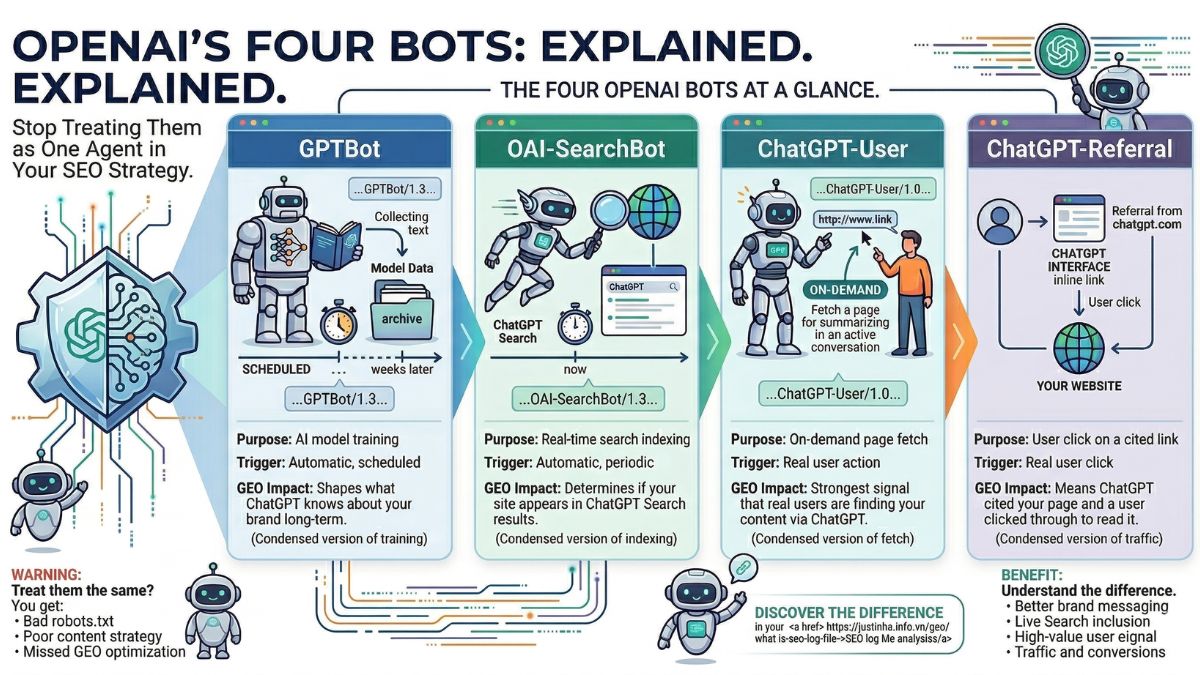
OpenAI runs four separate bots that interact with your website in completely different ways. If you treat them as one single “ChatGPT bot,” you will make bad decisions about your robots.txt, your content strategy, and your GEO optimization. Each bot has a specific job, a specific trigger, and a specific impact on your visibility in AI-generated answers.
This guide explains exactly what each OpenAI bot does, how to spot it in your SEO log file analysis, and what its presence means for your GEO strategy in 2026.
Why OpenAI Uses Four Different Bots
OpenAI built ChatGPT to do several different things at once: answer questions from training data, search the web in real time, fetch specific pages a user asks about, and send users to external websites through inline citations. Each of those tasks requires a different kind of web interaction. That is why OpenAI operates four separate bots instead of one.
Treating all four as identical causes real problems. You could block GPTBot to protect your training data while accidentally cutting yourself out of ChatGPT search results. Or you could allow OAI-SearchBot but block ChatGPT-User and miss the highest-value signal in your log file. Understanding the difference between each bot is the foundation of a working GEO strategy.
The Four OpenAI Bots at a Glance
| Bot | Purpose | Trigger | Impact on GEO |
|---|---|---|---|
| GPTBot | AI model training | Automatic, scheduled | Shapes what ChatGPT knows about your brand long-term |
| OAI-SearchBot | Real-time search indexing | Automatic, periodic | Determines if your site appears in ChatGPT Search results |
| ChatGPT-User | On-demand page fetch | Real user action | Strongest signal that real users are finding your content via ChatGPT |
| ChatGPT-Referral | User click on a cited link | Real user click | Means ChatGPT cited your page and a user clicked through to read it |
GPTBot: The AI Training Crawler
What Is GPTBot?
GPTBot is OpenAI’s primary web crawler. Its job is to collect content from across the internet and use that content to train OpenAI’s large language models, including GPT-4 and future versions of ChatGPT. When GPTBot visits your site, it reads your text, stores it, and feeds it into the training process that makes ChatGPT smarter over time.
This is an asynchronous, offline process. GPTBot is not fetching your pages to answer a user’s question right now. It is building the knowledge base that ChatGPT will draw from weeks or months from now. Think of it like a library researcher copying notes from your book. They are not reading it for a customer today. They are adding your information to a collection that will be used later.
GPTBot User Agent String
Mozilla/5.0 AppleWebKit/537.36 (KHTML, like Gecko; compatible; GPTBot/1.3; +https://openai.com/gptbot)How GPTBot Works
GPTBot crawls the web on a scheduled basis with long revisit intervals. It does not crawl pages as frequently as Googlebot because it does not need to index fresh content for search results. Its goal is broad coverage of quality content, not speed. It follows links from page to page, reads publicly accessible text, and respects your robots.txt file.
One key technical fact: GPTBot does not execute JavaScript. It downloads .js files but does not run them. If your most important content is loaded by JavaScript after the initial HTML, GPTBot will likely miss it. Static HTML content is what GPTBot reads best.
What GPTBot Means for GEO
Allowing GPTBot to crawl your site gives you control over what ChatGPT learns about your brand. If you block GPTBot, ChatGPT’s knowledge of your business comes entirely from what other websites say about you. That could include outdated information, competitor comparisons, or simply nothing. Allowing GPTBot to crawl your content means ChatGPT can learn directly from your own messaging, expertise, and products.
Blocking GPTBot does not block the other three OpenAI bots. Each bot is controlled independently in robots.txt. You can block GPTBot for training while still allowing OAI-SearchBot to include your site in ChatGPT search results.
GPTBot in Your Log File
On the justinha.info.vn log file covering February 28 to March 14, 2026, GPTBot made 93 requests. It spent most of its time on the sitemap and homepage before moving to specific content pages. It showed a clear preference for GEO-related content, visiting pages like /geo/what-is-generative-engine-optimization/ and /geo/what-is-llms-txt-llms-full-txt-cats-txt/ multiple times. It also accessed the WordPress REST API directly via /wp-json/wp/v2/posts/ to pull structured post data.
robots.txt Control for GPTBot
To allow GPTBot to train on your content:
User-agent: GPTBot
Allow: /
To block GPTBot from training on your content while keeping other bots active:
User-agent: GPTBot
Disallow: /
OAI-SearchBot: The ChatGPT Search Indexer
What Is OAI-SearchBot?
OAI-SearchBot is OpenAI’s search crawler. Its job is to index the web for ChatGPT’s real-time search feature, sometimes called SearchGPT. When a ChatGPT user asks a question that requires current information, ChatGPT uses OAI-SearchBot’s index to find and surface relevant web pages. OAI-SearchBot does not collect data for AI model training. Its only job is to power live search results inside ChatGPT.
This is the bot that determines whether your website appears when someone types a question into ChatGPT’s search box. If OAI-SearchBot cannot crawl your site, your pages will not appear in ChatGPT search results, even if GPTBot has already trained on your content.
OAI-SearchBot User Agent String
Mozilla/5.0 (Macintosh; Intel Mac OS X 10_15_7) AppleWebKit/537.36 (KHTML, like Gecko) Chrome/131.0.0.0 Safari/537.36; compatible; OAI-SearchBot/1.3; +https://openai.com/searchbotHow OAI-SearchBot Works
OAI-SearchBot crawls periodically, similar to Bingbot. It updates its index regularly so ChatGPT can surface current information. Its crawl pattern is more targeted than GPTBot because it is looking for pages that will answer specific user queries. Like GPTBot, it does not execute JavaScript, so server-side rendered or static HTML content gets the best coverage.
OAI-SearchBot is believed to work alongside Bing’s index. OpenAI has a data partnership with Microsoft, and OAI-SearchBot supplements this by doing its own crawling. Pages that are already indexed in Bing have an advantage, but OAI-SearchBot also independently discovers and indexes content.
What OAI-SearchBot Means for GEO
This is the bot that most directly affects your ChatGPT search visibility. If you want your content to appear when users search inside ChatGPT, you need OAI-SearchBot to be able to crawl your site. OpenAI officially states that allowing OAI-SearchBot in your robots.txt is required for your pages to appear in ChatGPT search results.
Unlike GPTBot, most SEOs and content creators agree that blocking OAI-SearchBot is a bad idea for visibility. Blocking it means you opt out of ChatGPT search inclusion entirely. The only reason to block it is if you genuinely do not want your content surfaced in ChatGPT at all.
OAI-SearchBot in Your Log File
In the sample log, OAI-SearchBot made 66 requests. It checked robots.txt 45 times, showing it was actively checking crawl permissions. It focused on case study pages and GEO content, including /geo-ai-branding/. It also accessed WordPress REST API endpoints and oEmbed data, suggesting it pulls structured metadata to understand content context before deciding what to index.
robots.txt Control for OAI-SearchBot
User-agent: OAI-SearchBot
Allow: /
ChatGPT-User: The On-Demand Page Fetcher
What Is ChatGPT-User?
ChatGPT-User is triggered by a real person. When a ChatGPT user shares a specific URL and asks ChatGPT to read it, summarize it, or answer questions about it, ChatGPT sends the ChatGPT-User bot to fetch that page in real time. This bot does not crawl the web automatically. It only acts when a human tells it to visit a specific page.
This makes ChatGPT-User fundamentally different from GPTBot and OAI-SearchBot. Those two bots run on schedules and crawl broad swaths of the internet. ChatGPT-User is reactive. It exists only because a real person found your URL, brought it into a ChatGPT conversation, and asked ChatGPT to read it.
ChatGPT-User User Agent String
Mozilla/5.0 AppleWebKit/537.36 (KHTML, like Gecko); compatible; ChatGPT-User/1.0; +https://openai.com/botHow ChatGPT-User Works
When a user shares a link in a ChatGPT conversation, ChatGPT sends the ChatGPT-User bot to fetch the page content. The bot reads the page and gives that content to ChatGPT, which then uses it to answer the user’s question in that conversation. The content fetched by ChatGPT-User is used only for that specific conversation. OpenAI has stated that ChatGPT-User does not contribute to large-scale training datasets.
Like the other OpenAI bots, ChatGPT-User does not run JavaScript. It reads the raw HTML of your page. It also respects your robots.txt file. If you block ChatGPT-User, ChatGPT cannot fetch your pages even when a real user specifically asks it to. That means a person trying to get help understanding your content would be blocked from doing so.
What ChatGPT-User Means for GEO
ChatGPT-User visits are the strongest positive signal in your log file. They tell you that a real person found your URL valuable enough to bring into a ChatGPT conversation. This is not an automated crawl. It is a human actively engaging with your content through AI. Seeing ChatGPT-User frequently in your logs means your content is being used by real people in real AI conversations.
In the sample log, ChatGPT-User made 28 requests across two weeks. Given that each request represents a real human interaction, 28 visits in two weeks is a meaningful signal that justinha.info.vn content is being actively used inside ChatGPT conversations.
robots.txt Control for ChatGPT-User
User-agent: ChatGPT-User
Allow: /
Blocking ChatGPT-User is generally a bad idea. It prevents real users from getting help with your content inside ChatGPT. It does not protect your training data or prevent ChatGPT search indexing. Those are controlled by GPTBot and OAI-SearchBot respectively.
ChatGPT-Referral: The Traffic Signal
What Is ChatGPT-Referral?
ChatGPT-Referral is not a bot at all. It is a referral traffic source that appears in your Google Analytics or other web analytics platforms. When ChatGPT includes a link to your page in a generated answer and a user clicks that link, the visit to your site shows up in your analytics as a referral from chatgpt.com or with a utm_source=chatgpt.com parameter.
This is the clearest possible signal that ChatGPT is actively recommending your content to its users. The bot crawled your site, ChatGPT decided your page was a good answer to someone’s question, it included a link in its response, and a real person clicked through to read your content. Every step of that chain had to work correctly for you to get a ChatGPT-Referral visit.
How ChatGPT-Referral Works
When ChatGPT generates a response that includes citations, it adds links to source pages. If a user clicks one of those links, they leave ChatGPT and land on your website. Your analytics platform records this visit as coming from chatgpt.com. Some visits appear with a utm_source=chatgpt.com UTM parameter that OpenAI adds automatically. Others may appear as direct traffic if the user copies and pastes the URL instead of clicking the inline link.
ChatGPT-Referral traffic is widely reported as having higher-than-average quality. Research data shows that ChatGPT referral visitors convert at around 15.9%, which is higher than most organic search traffic. They have already read a ChatGPT summary of your content, so they arrive with context and clear intent.
What ChatGPT-Referral Means for GEO
ChatGPT-Referral traffic is the business outcome of successful GEO. The entire chain from GPTBot training to OAI-SearchBot indexing to ChatGPT citation to user click leads to this moment. If you see ChatGPT-Referral traffic growing in your analytics, your GEO strategy is working.
The volume of ChatGPT-Referral traffic is still relatively small compared to Google organic traffic for most sites. AI platforms account for about 1% of total web traffic on average. However, that 1% converts better, engages longer, and represents a channel that is growing much faster than organic search. AI referral traffic is growing roughly 165 times faster than organic search traffic, based on data published by WebFX in mid-2025.
How to Track ChatGPT-Referral in GA4
In Google Analytics 4, go to Reports then Acquisition then Traffic Acquisition. Use the search box to filter by “chatgpt” or “openai.” You can also create a custom segment called “AI Traffic” where the session source matches a list of AI platforms including chatgpt.com, perplexity.ai, claude.ai, and others. This gives you a single view of all AI referral traffic across platforms.
Some ChatGPT traffic shows up as direct because users copy and paste URLs rather than clicking inline citations. If you see spikes in direct traffic alongside ChatGPT growth, those may be related.
How the Four Bots Work Together
Understanding each bot separately is important, but the bigger picture is how they work together as a system. Here is the full journey from crawl to citation to click:
- Step 1 (GPTBot): GPTBot crawls your content over time and adds it to ChatGPT’s training data. ChatGPT learns what your brand does, what topics you cover, and what expertise you have. This shapes ChatGPT’s base knowledge about you.
- Step 2 (OAI-SearchBot): OAI-SearchBot indexes your pages for real-time search. When a user asks a question in ChatGPT that requires current information, ChatGPT searches its index and may find your page. It includes a link to your page in the answer.
- Step 3 (ChatGPT-User): A separate user finds your URL somewhere, brings it into a ChatGPT conversation, and asks ChatGPT to read it. ChatGPT-User fetches the page and gives the content to ChatGPT for that conversation.
- Step 4 (ChatGPT-Referral): A user sees your page cited in a ChatGPT answer and clicks the link. They land on your website. Your analytics shows a referral from chatgpt.com.
Each step depends on the previous one being allowed and working correctly. Block GPTBot and ChatGPT’s knowledge of your brand weakens. Block OAI-SearchBot and your pages never appear in ChatGPT search results. Block ChatGPT-User and real people cannot use ChatGPT to help them understand your content. Fix any broken status codes that bots encounter and you improve the success rate of every step.
The Relationship Between GPTBot and OAI-SearchBot
Research from Akamai published in late 2025 found evidence that GPTBot and OAI-SearchBot behavior is correlated. GPTBot activity tends to follow OAI-SearchBot activity with a slight time offset. One possible explanation is that GPTBot uses OAI-SearchBot’s search data to find the highest-quality content to train on. Pages that get a lot of search queries in ChatGPT may also get more GPTBot visits because OpenAI wants training data on topics users actually search for.
After OpenAI released GPT-5 in August 2025, OAI-SearchBot traffic increased by 136%, ChatGPT-User by 65%, and GPTBot by 66%. This confirms that major model releases trigger increased crawl activity across all three bots simultaneously. If you see a sudden spike in any of these bots in your log file, check whether OpenAI made a major announcement around that date.
JavaScript Rendering: A Critical Technical Issue for All Four Bots
None of the four OpenAI bots execute JavaScript. They download JavaScript files but do not run them. This is one of the most important technical facts for GEO. If your website renders content dynamically through JavaScript, that content is invisible to all OpenAI bots.
This affects websites built with React, Vue, Angular, or other JavaScript frameworks where content is loaded after the initial HTML response. It also affects WordPress sites that use JavaScript-heavy page builders if critical content is injected by JavaScript rather than included in the initial HTML. The solution is server-side rendering or prerendering, which delivers the full page content in the initial HTML response without requiring JavaScript execution.
For WordPress sites, this is less of an issue if you use standard themes because most WordPress content is delivered in static HTML. But if you use Elementor, Divi, or similar page builders with heavy JavaScript, check whether your most important content appears in the page source by right-clicking and selecting View Page Source.
Recommended robots.txt Setup for GEO Visibility
If your goal is maximum visibility across all ChatGPT features, here is the robots.txt configuration that allows all four OpenAI bots:
User-agent: GPTBot
Allow: /

User-agent: OAI-SearchBot
Allow: /

User-agent: ChatGPT-User
Allow: /
If you want to allow ChatGPT search visibility but not contribute to AI model training:
User-agent: GPTBot
Disallow: /

User-agent: OAI-SearchBot
Allow: /

User-agent: ChatGPT-User
Allow: /
Note that changes to robots.txt take approximately 24 hours to affect ChatGPT search behavior. GPTBot changes may take longer to reflect in ChatGPT’s knowledge base because training happens on a slower cycle.
How to Find All Four Bots in Your SEO Log File
Your server log file is the only place where you can see GPTBot, OAI-SearchBot, and ChatGPT-User together in one view. Here is what to look for in each log line:
- GPTBot: Look for
GPTBot/1.3in the user agent string. Check which pages it visits and how often. Focus on whether it is finding your most important content or spending time on low-value URLs like parameter pages or pagination. - OAI-SearchBot: Look for
OAI-SearchBot/1.3. Check the status codes it receives. Any 404 errors it hits are pages you could be ranking for in ChatGPT search but are not. - ChatGPT-User: Look for
ChatGPT-User/1.0. Every request from this bot represents a real human interaction. Note which pages they visit most. These are your pages with the highest current GEO value. - ChatGPT-Referral: This does not appear in server logs. Check your analytics platform for traffic from chatgpt.com or utm_source=chatgpt.com.
Analyzing a log file manually is time-consuming, especially as files grow to hundreds of megabytes. A good tool makes this process fast and clear, and you do not need to pay for enterprise software to do it.
Analyze All Your AI Bots for Free
You do not need to pay 99 euros per year for Screaming Frog to analyze your server logs. The free SEO Log File Analyzer Tool requires no software installation and handles files up to 1GB, which covers around 5 million rows of log data. Upload your log file and instantly see which AI bots are crawling your site, which pages they visit, what status codes they receive, and how your crawl budget is being used across AI Bots including GPTBot, OAI-SearchBot, ClaudeBot, Applebot, and every other major AI crawler.
What GEO Practitioners Should Do With This Data
Once you understand which bots are visiting your site and what they are reading, you can take targeted action. Here is what to prioritize based on what you find:
- If GPTBot is crawling low-value pages: Improve your internal linking to guide it toward your most important content. Add those key pages to your sitemap. Reduce crawl budget waste on parameter URLs and pagination.
- If OAI-SearchBot is getting 404 errors: Fix or redirect those pages. Each 404 is a missed opportunity to appear in ChatGPT search results for a topic you could own.
- If ChatGPT-User visits are low: This means real users are not bringing your content into ChatGPT conversations. Focus on creating content that answers specific, searchable questions. Content that gets shared tends to get used in AI conversations.
- If ChatGPT-Referral traffic is not growing: This is a content quality and citation signal issue. ChatGPT is either not finding your pages or not citing them. Focus on answer-first content structure, entity optimization, and building your brand’s presence on the platforms LLMs learn from, including Reddit, LinkedIn, and YouTube.
From Log File Analysis to Full GEO Strategy
Knowing that GPTBot visited your site 93 times is useful data. Knowing that it spent most of those visits on GEO-related content, avoided your service pages, and never found your case studies is actionable intelligence. That gap between what the bot found and what you want it to read is exactly where GEO strategy begins.
Every day your brand is absent from AI-generated answers, a competitor earns that recommendation instead. Justin Ha’s GEO AI SEO Branding in Vietnam service turns log file insights into a structured AI visibility strategy, covering AI Visibility Audits across ChatGPT, Perplexity, and Google AI Overviews, LLMs.txt and schema setup, monthly prompt testing, and off-site authority building on the platforms LLMs actively learn from.
Frequently Asked Questions
Can I block GPTBot without affecting ChatGPT search results?
Yes. GPTBot and OAI-SearchBot are controlled independently in robots.txt. Blocking GPTBot prevents your content from being used in AI model training. It does not affect whether your pages appear in ChatGPT search results. That is controlled by OAI-SearchBot. You can block one and allow the other with no conflict.
Does ChatGPT-User contribute to AI training?
No. OpenAI has stated that content fetched by ChatGPT-User is used only for the specific conversation that triggered it. It does not feed into large-scale training datasets. Blocking ChatGPT-User does not protect your training data. It only prevents real users from getting ChatGPT’s help with your content.
Why does OAI-SearchBot check robots.txt so many times?
In the sample log, OAI-SearchBot checked robots.txt 45 times. This is normal behavior. Crawlers re-read robots.txt frequently to check whether crawl permissions have changed. It does not mean there is a problem. It means OAI-SearchBot is actively trying to crawl your site and is confirming permissions before each session.
How long does it take to appear in ChatGPT search after allowing OAI-SearchBot?
OpenAI states it takes approximately 24 hours after a robots.txt update for their systems to adjust for search results. Full indexing of your content may take longer depending on your site’s size and how frequently OAI-SearchBot revisits.
Is ChatGPT-Referral traffic worth optimizing for?
Yes, even though the volume is currently small. Research shows ChatGPT-Referral visitors convert at around 15.9% and have significantly higher session engagement than average organic visitors. The channel is also growing at roughly 165 times the speed of organic search traffic. Getting into ChatGPT citations now, while competition is lower, builds a position that becomes harder to displace over time.
How do I know if ChatGPT is citing my pages?
Check your Google Analytics for traffic from chatgpt.com or with a utm_source=chatgpt.com parameter. Also look for the ChatGPT-User bot in your server logs, as its presence confirms real users are bringing your URLs into ChatGPT conversations. You can also test directly by asking ChatGPT questions related to your topic and checking whether your site appears in the cited sources. If you are being crawled but never cited, read the full breakdown of why AI bots crawl your site but never cite you and how to fix each case.
Conclusion
GPTBot, OAI-SearchBot, ChatGPT-User, and ChatGPT-Referral are four separate systems with four separate jobs. Treating them as one bot leads to poor robots.txt decisions and missed GEO opportunities. Understanding each one tells you exactly where your ChatGPT visibility stands and what to fix next.
Your server log file is the starting point. It shows you which bots are crawling your site, what they are reading, and what status codes they receive. That data is the foundation of every GEO decision you make. Use the free SEO Log File Analyzer Tool to upload your log file and get a full breakdown of every AI bot that has visited your site, completely free, with no file size limit up to 1GB and no sign-up required.