How to Read AI Bot Crawl Budget in Your SEO Log File
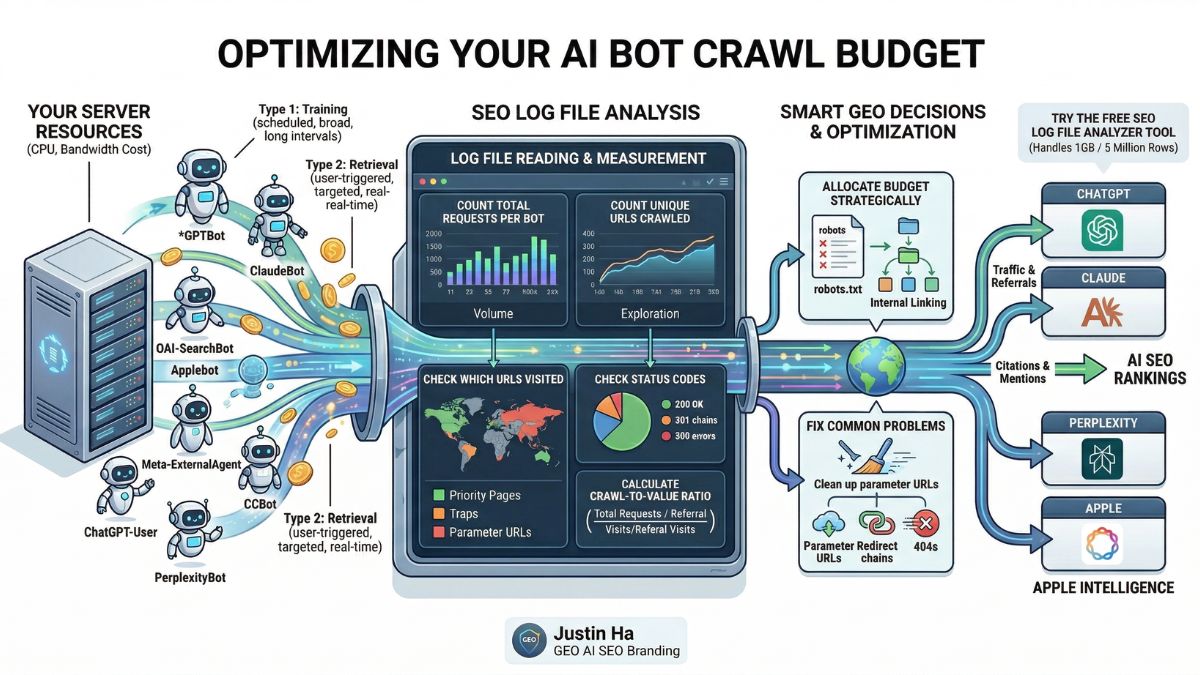
Your server is spending real resources on every bot that visits your site. Some of those bots send you traffic, citations, and AI visibility. Others crawl thousands of pages and send nothing back. Your SEO log file is the only place where you can see exactly what is happening and make smart decisions about it.
This guide explains what AI bot crawl budget is, how to read it in your log file, and how to use that data to improve your visibility across ChatGPT, Claude, Perplexity, and every other major AI platform in 2026.
What Is AI Bot Crawl Budget?
Crawl budget is the number of pages a bot crawls on your site within a given time period. For traditional SEO, crawl budget refers to how many pages Googlebot crawls per day. For GEO in 2026, crawl budget now covers every AI bot that visits your site: GPTBot, OAI-SearchBot, ClaudeBot, Applebot, meta-externalagent, Bingbot, and more.
Each of those bots has its own crawl budget. Each one spends that budget differently. And each one returns a different level of value to your site. Some bots crawl a lot and send high-value traffic back. Others crawl a lot and send nothing at all. Understanding the difference is what separates a passive GEO strategy from an active one.
Unlike Googlebot, which crawls to build a search index that drives direct organic traffic, AI bots crawl for multiple different purposes: training large language models, building real-time search indexes, fetching pages for live user conversations, and powering AI-generated answers. The value each bot returns to your site depends entirely on which of those purposes it serves.
Why AI Crawl Budget Matters More Than You Think
AI bots now account for a significant share of total bot traffic on many websites. Research published in early 2026 covering 48 days of server logs found that AI and crawler bot requests made up 16.9% of all site traffic. That is a real server cost: bandwidth consumed, CPU cycles used, response times affected.
The problem is that most of that crawl activity does not return equal value. Research shows that GPTBot currently operates at a ratio of around 1,276 crawls per single referral visit. ClaudeBot consumes even more resources relative to the traffic it returns. High crawl-to-referral ratios do not mean these bots are bad. They mean you need to understand what each bot is actually doing and optimize for the ones that matter most to your goals.
At the same time, AI referral traffic converts far better than organic search traffic. Visitors who arrive from AI citations are further along in their decision-making process. They have already used AI to research and compare options before clicking your link. That makes each AI referral visit genuinely valuable, even when the volume is still small.
The Two Types of AI Crawl Budget
Before you can read your log file correctly, you need to understand that not all AI crawl activity is the same. There are two fundamentally different types of AI bots visiting your site, and they have opposite relationships with your crawl budget.
Type 1: Training and Indexing Crawlers
These bots crawl your site automatically on a scheduled basis. They collect content for AI model training or to build search indexes. Examples include GPTBot, ClaudeBot, Google-Extended, meta-externalagent, and CCBot. They run whether or not a human is actively looking for your content. Their crawl volume tends to be high and their revisit intervals vary widely.
Training crawlers build the long-term knowledge base that AI systems draw from. The value they return is indirect: better brand representation in AI-generated answers over time. You do not see a direct traffic spike when a training crawler visits. You see the result months later when ChatGPT or Claude starts mentioning your brand more accurately.
Type 2: Retrieval and User-Triggered Bots
These bots fetch pages in response to a real user action. Examples include OAI-SearchBot, ChatGPT-User, Claude-User, and PerplexityBot. Their crawl volume tends to be lower and more targeted. They visit specific pages because a user asked a relevant question or shared a specific URL.
Retrieval bots have a much better crawl-to-value ratio because their visits are connected directly to human intent. When OAI-SearchBot crawls your page, it is building an index that will be used to answer real user questions. When ChatGPT-User visits, a real person is reading your content inside a ChatGPT conversation right now. These visits are worth more per crawl than any training bot visit.
How to Read Crawl Budget in Your SEO Log File
Every line in your server log file represents one request from one bot to one URL. To understand your AI crawl budget, you need to aggregate those lines and look for patterns. Here is what to measure and what it tells you.
Step 1: Count Total Requests Per Bot
The first number to calculate is how many requests each bot made in a given period. Sort your log file by user agent string and count the rows for each bot. This gives you your raw crawl volume per bot.
What to look for: bots with very high request counts relative to your site size. If a bot is making hundreds of requests per day on a small site, it is either being very thorough or it is getting caught in crawl traps like infinite pagination or parameter URLs.
Step 2: Count Unique URLs Crawled Per Bot
Total requests and unique URLs crawled are different numbers. A bot that makes 200 requests but only visits 20 unique URLs is re-crawling the same pages repeatedly. A bot that makes 200 requests across 180 unique URLs is exploring broadly.
Re-crawling can be a positive sign: it means the bot considers those pages important enough to revisit. But re-crawling can also indicate a problem, such as a bot stuck in a redirect loop or following paginated URLs that all lead to the same content.
Step 3: Check Which URLs Each Bot Visits
This is where crawl budget analysis becomes directly actionable. Extract the list of URLs each bot visited and compare it to your list of priority pages. Ask these questions:
- Are the bots finding your most important service pages, product pages, and cornerstone content?
- Are they spending time on low-value pages like tag archives, author pages, or search result pages?
- Are they crawling URLs with query parameters that create duplicate content?
- Are they missing entire sections of your site that you want indexed for GEO?
The gap between what a bot crawls and what you want it to crawl is your optimization target.
Step 4: Check Status Codes Per Bot
Every request in your log file has a status code. For crawl budget analysis, focus on three patterns:
- High 404 rate: The bot is spending crawl budget on pages that do not exist. Fix or redirect these URLs. Each 404 is wasted budget that could have been spent on a page that helps your GEO visibility.
- High 301 rate: The bot is following redirect chains. Each redirect hop consumes budget. Check whether your redirect chains can be shortened to go directly from old URL to final destination.
- Any 500 errors: Server errors during a bot crawl are a serious problem. Bots that receive repeated 500 errors will reduce their crawl frequency or stop crawling your site entirely. Monitor these closely.
Step 5: Calculate the Crawl-to-Value Ratio
This is the most important number for GEO decision-making. Compare each bot’s crawl volume in your log file against the referral traffic it sends in your analytics. The formula is simple:
Crawl-to-Referral Ratio = Total Bot Requests / Referral Visits from That Platform
A lower ratio means a bot is efficiently converting its crawl activity into real traffic for you. A very high ratio means the bot is consuming your server resources without sending visitors back. Industry data shows GPTBot currently runs at around 1,276 crawls per referral visit, while some bots can reach ratios of 10,000 or more. Use this number to decide how much crawl budget each bot deserves.
AI Bot Crawl Behavior: What Each Bot Actually Does
Understanding how each major AI bot uses its crawl budget helps you predict what you will see in your log file and what it means.
GPTBot: High Volume, Long Intervals, Burst Pattern
GPTBot does not crawl continuously. It crawls in short, intense bursts. Research from 2026 found GPTBot hit 114 requests per minute in a single 3-minute window before going quiet again. This burst behavior means your log file will show large clusters of GPTBot activity on specific dates rather than a steady daily flow.
GPTBot also tends to activate on a site once that site’s content gains traction in OpenAI’s ecosystem. Sites that start receiving ChatGPT-User visits often see GPTBot arrive weeks later as a follow-up. This suggests OpenAI uses user engagement signals to decide which sites are worth training on.
OAI-SearchBot: Frequent robots.txt Checks, Targeted Crawling
OAI-SearchBot is the most persistent robots.txt checker of any AI bot. It checks your robots.txt file multiple times per day without exception. This is because OAI-SearchBot needs to confirm crawl permissions before every session. If you change your robots.txt, OAI-SearchBot will pick it up faster than any other bot.
Its actual page crawling is more targeted than GPTBot. It focuses on content that answers specific user queries rather than broad coverage. Pages that rank well in Bing tend to get crawled by OAI-SearchBot more frequently because OAI-SearchBot works alongside Bing’s index to power ChatGPT search results.
ClaudeBot: Systematic, Sitemap-First
ClaudeBot follows a very structured crawl pattern. It reads your robots.txt and sitemap before crawling individual pages. In a typical two-week log sample, ClaudeBot may spend the majority of its requests on robots.txt and sitemap files alone before moving to content pages. This systematic behavior means having a clean, complete sitemap directly improves ClaudeBot’s coverage of your important content.
Meta-ExternalAgent: High Volume, Sitemap-Focused
Meta’s crawler is typically the highest-volume AI bot on most sites. It is especially focused on XML sitemaps and uses them aggressively to discover new content. Meta-ExternalAgent powers Meta AI across Facebook, Instagram, and WhatsApp. Its high crawl volume reflects Meta’s broad content collection strategy for training Llama models.
Applebot: Full Browser Rendering
Applebot is unique among AI bots because it renders JavaScript. While GPTBot, OAI-SearchBot, and ClaudeBot all skip JavaScript execution, Applebot downloads and runs CSS and JS files like a real browser. This means Applebot can see content that other AI bots miss entirely. If you have JavaScript-rendered content that is important for Apple Intelligence visibility, Applebot is your best chance of having it crawled.
ChatGPT-User: Low Volume, High Value
ChatGPT-User has the lowest crawl volume of any OpenAI bot but the highest per-visit value. Each request represents a real person in a real conversation. It does not crawl the web automatically. It only visits a page when a human user specifically triggers it. In your log file, ChatGPT-User visits are scattered and unpredictable because they depend entirely on user behavior.
Common Crawl Budget Problems Found in Log Files
Here are the most common crawl budget issues that show up when you analyze AI bot behavior in your log file:
- Bots crawling parameter URLs: URLs like
/?page=2,/?sort=price, or/?s=search+termcreate near-infinite variations of the same content. Bots that follow these URLs waste enormous amounts of crawl budget on pages with no GEO value. Block these in robots.txt or use canonical tags to consolidate them. - Bots missing key content sections: If a bot never visits your service pages, case studies, or cornerstone articles, it cannot index or train on that content. The fix is improving internal linking from pages the bot does visit to pages you want it to discover.
- Redirect chains consuming budget: Every 301 redirect is a separate server request. A chain of three redirects means three requests for one page. Flatten redirect chains to go directly from the original URL to the final destination.
- 404s from outdated external links: When other websites link to pages that no longer exist on your site, bots follow those links and hit 404 errors. Use your log file to identify the most common 404 URLs and either restore the content, redirect to the closest equivalent, or return a proper 410 Gone response.
- JavaScript-rendered content invisible to most bots: If your key content loads after the initial HTML, GPTBot, OAI-SearchBot, ClaudeBot, and most other AI bots will miss it. Server-side rendering or prerendering solves this. Applebot is the only major AI bot that can see JavaScript-rendered content without prerendering.
- Low-priority pages consuming high crawl budget: Tag pages, author archives, empty category pages, and thin content pages attract bot crawls but have no GEO value. Adding
noindexto these pages and blocking them in robots.txt frees up crawl budget for pages that actually matter.
How to Optimize Your Crawl Budget for GEO
Once you understand how each bot is spending its crawl budget on your site, you can take targeted steps to redirect that budget toward your most important content.
Keep Your Sitemap Clean and Current
Your XML sitemap is the first document most AI bots read. ClaudeBot and OAI-SearchBot both rely heavily on sitemaps to decide what to crawl. A sitemap that includes 404 pages, redirected URLs, noindex pages, or low-value thin content wastes the first impression you make on every AI bot. Audit your sitemap regularly and include only canonical, indexable, high-value URLs.
Strengthen Internal Linking to Priority Pages
Bots discover content by following links. If your most important pages have few internal links pointing to them, bots may never find them during their crawl sessions. Add contextual internal links from high-traffic pages to the pages you most want AI bots to crawl and train on.
Fix Status Code Issues Before They Compound
A single 404 that a bot encounters repeatedly wastes crawl budget every time. A redirect chain that bots follow on every visit multiplies the waste. Fix these issues in priority order: 500 errors first, then 404s that receive bot traffic, then redirect chains longer than two hops.
Use robots.txt Strategically, Not Defensively
robots.txt is not just a tool for blocking bad bots. It is a crawl budget allocation tool. By blocking low-value sections of your site from all bots, you concentrate their crawl activity on the pages that actually matter for GEO. Block admin paths, parameter URLs, search result pages, and thin content sections. Let bots focus their budget on your cornerstone content.
Consider the Crawl-to-Value Ratio When Making Block Decisions
Before blocking any AI bot, calculate its crawl-to-referral ratio. A bot with a ratio of 500:1 is still worth 10 times more than a bot with a ratio of 5,000:1. The question is not just how much a bot crawls, but how much value it returns per crawl. Bots with extremely high ratios and no discernible referral traffic are candidates for blocking or rate limiting. Bots with high crawl volume but also meaningful referral traffic deserve generous crawl access.
Reading Crawl Budget Across All AI Bots: A Practical Checklist
Use this checklist when you open your log file for a monthly crawl budget review:
- Count total requests and unique URLs per bot for the period
- Check whether priority pages appear in each bot’s crawl list
- Calculate the percentage of each bot’s requests that result in 200 status codes
- Identify the top 10 URLs receiving 404 responses from bots
- Check for redirect chains by looking for sequences of 301 responses from the same bot in a short time window
- Compare each bot’s crawl volume this month versus last month to spot trends
- Cross-reference your analytics to calculate the crawl-to-referral ratio for each AI platform
- Check whether your sitemap URLs match the URLs bots are actually finding through links
Analyze Your AI Bot Crawl Budget for Free
You do not need to pay 99 euros per year for Screaming Frog to do this analysis. The free SEO Log File Analyzer Tool handles files up to 1GB, which covers around 5 million rows of log data. Upload your log file and instantly see a breakdown of every AI bot’s crawl activity on your site: request counts, unique URLs, status code distribution, and crawl patterns across GPTBot, OAI-SearchBot, ClaudeBot, Applebot, meta-externalagent, and every other major AI crawler. No software installation, no sign-up required, completely free.
From Crawl Budget to Full GEO Visibility
Crawl budget analysis tells you what bots are doing on your site today. GEO strategy determines what you want them to do next. Knowing that a retrieval bot is crawling your homepage but missing your case studies is the starting point. Knowing how to fix your internal linking, sitemap, and content structure to change that behavior is where GEO expertise comes in.
Every day your brand is absent from AI-generated answers, a competitor earns that recommendation instead. Justin Ha’s GEO AI SEO Branding in Vietnam service turns crawl budget data into a structured AI visibility strategy, covering AI Visibility Audits across ChatGPT, Perplexity, and Google AI Overviews, technical GEO setup including LLMs.txt and schema, monthly prompt testing, and off-site authority building on the platforms LLMs actively learn from.
Frequently Asked Questions
Is AI bot crawl budget the same as Google crawl budget?
They are related concepts but not the same thing. Google crawl budget refers specifically to how many pages Googlebot crawls per day and is tied directly to your Google search indexing. AI bot crawl budget covers all the other bots: GPTBot, ClaudeBot, OAI-SearchBot, and more. Each has its own crawl rate and its own relationship with your server resources. Managing both is important, but they require different strategies because AI bots have different goals than Googlebot.
Can AI bots slow down my website?
Yes. Research shows that AI crawlers can consume up to 30TB of bandwidth on active sites and cause significant CPU load during burst crawling sessions. GPTBot in particular is known to crawl in short, very high-intensity bursts. If your hosting plan has bandwidth limits or your server struggles under burst traffic, AI bot crawl volume is worth monitoring closely. Your log file will show you when and how hard each bot hits your server.
Should I block high-volume AI bots to save server resources?
It depends on the crawl-to-referral ratio. If a bot crawls heavily and returns meaningful AI referral traffic or citation visibility, blocking it would hurt your GEO performance. If a bot crawls heavily and returns nothing at all, blocking or rate limiting it is a reasonable infrastructure decision. Calculate the ratio before making any block decision. Never block OAI-SearchBot, ChatGPT-User, or PerplexityBot if GEO visibility is a goal, as these directly affect your appearance in AI-generated answers.
How often should I review AI bot crawl budget?
Monthly is the right cadence for most sites. If you have recently made major changes to your site structure, robots.txt, or content, check your log file within 48 to 72 hours to confirm bots are responding to the changes as expected. After a major OpenAI, Google, or Anthropic model release, check your log file within a week because model releases consistently trigger increased crawl activity across all associated bots.
What is a healthy crawl-to-referral ratio for AI bots?
There is no universal benchmark because the ratio depends on your site size, content type, and how long you have been optimizing for GEO. A ratio under 1,000:1 for major bots like GPTBot and ClaudeBot is reasonable for a new site. As your GEO strategy matures and more of your content gets cited in AI answers, that ratio should improve.
Ratios consistently above 10,000:1 with no referral growth suggest the bot is crawling content it cannot use effectively. If you’re seeing this pattern, it’s a strong signal that your content may not be passing key citation thresholds. Learn how to fix this in our guide on why AI crawls your site but doesn’t cite it.
Conclusion
AI bot crawl budget is one of the most underanalyzed metrics in GEO. Your log file already contains everything you need to understand which bots are spending time on your site, what they are reading, whether they are finding your best content, and how much value they are returning. The difference between a site that appears regularly in AI-generated answers and one that does not often comes down to whether bots are efficiently finding and reading the right pages.
Start with your log file. Measure crawl volume, unique URLs, status codes, and crawl-to-referral ratios per bot. Fix the most common problems first: 404s, redirect chains, parameter URL crawl traps, and missing internal links to priority pages. Use the free SEO Log File Analyzer Tool to make this process fast and clear, with no software to install and no file size limit up to 1GB.