What Is a SEO Log File? Guide for AI Bots & GEO (2026)
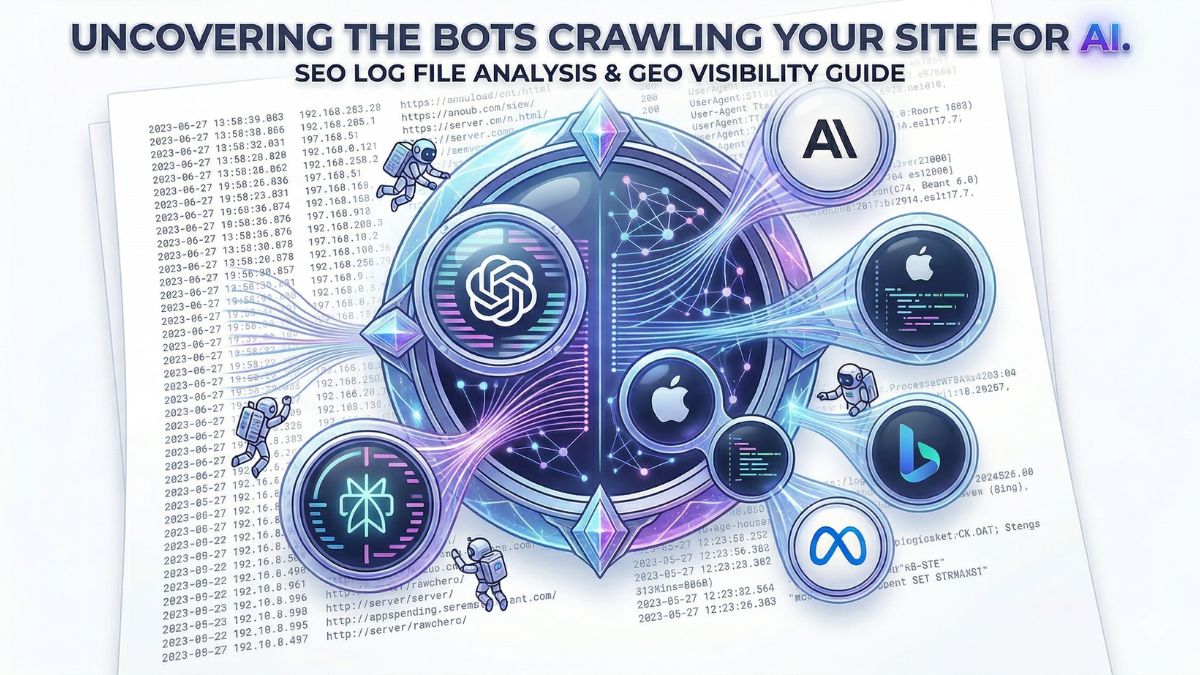
- An SEO log file is a plain text record your server writes for every visit, human or bot, capturing IP, timestamp, URL, status code, and user agent.
- In 2026, log files are the only direct evidence that AI bots (GPTBot, ClaudeBot, PerplexityBot, Applebot-Extended, and others) actually crawled a site, data Google Search Console never shows.
- The article catalogs 19 key AI/search bots by company and product, with detailed breakdowns of the 8 most important ones (GPTBot, OAI-SearchBot, ChatGPT-User, ChatGPT-Referral, ClaudeBot, PerplexityBot, Meta-ExternalAgent, Bingbot).
- 4 things to check in any log file: which AI bots show up, which pages they crawl, what status codes they get (200/301/404/403/410/500), and how often they return.
- Common problems log files expose: important pages never crawled by AI bots, crawl budget wasted on parameter URLs, redirect chains, and bot traffic inflating analytics.
- A free tool (up to 1GB / 5 million rows) replaces the 99€/year Screaming Frog Log File Analyser for this analysis.
If you manage a website, your server is quietly recording every single visit from real users and from bots. Those records are stored in your SEO log file. In the age of Generative Engine Optimization (GEO), reading your log file is no longer optional. It tells you exactly which AI bots are crawling your site, what they read, and how often they come back.
This guide explains what an SEO log file is, how to read it, and what the data means for visibility in AI-powered search engines like ChatGPT, Claude, Perplexity, and Apple Intelligence, the same crawler behavior covered in how AI bots reach your website.
What Is an SEO Log File?
An SEO log file (also called a server log or access log) is a plain text file your web server creates automatically. Every time someone or something visits, the server writes one line to the log, recording the IP address, date and time, requested URL, HTTP status code, response size, referrer, and user agent string.
Here is an example of a single line from a real log file:
66.249.75.69 - - [28/Feb/2026:19:37:06 +0700] "GET /robots.txt HTTP/1.1" 200 125 "-" "Mozilla/5.0 (compatible; Googlebot/2.1; +http://www.google.com/bot.html)"That one line tells you Googlebot visited your robots.txt file on February 28, 2026, and received a successful 200 response. Multiply that by thousands of lines, and you have a complete picture of how every bot and user interacts with your site.
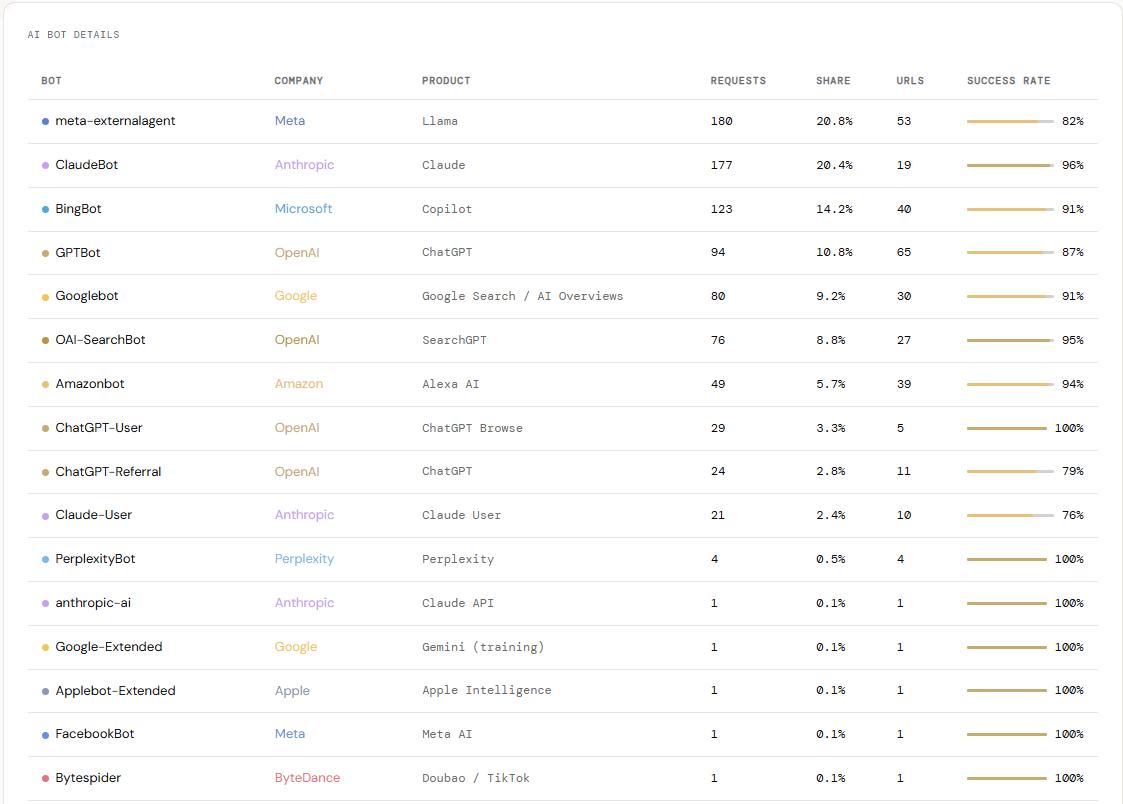
Why SEO Log File Analysis Matters in 2026
Log file analysis has always been a powerful technical SEO tool. In 2026, it has become critical for a new reason: AI bots are now some of the most active crawlers on the web, and they determine whether content appears in AI-generated answers.
Traditional SEO tools show Google rankings. Log file analysis shows something different, what is actually happening on the server, right now, from every bot that exists. You can see if GPTBot is ignoring your most important pages, if ClaudeBot is reading your content regularly, or if Perplexity is crawling pages you did not even know were indexed.
Without log file analysis, you are flying blind in the GEO era. Google Search Console only tells part of the story. It cannot see GPTBot, ClaudeBot, or any other AI crawler.
What Is GEO and Why Does It Connect to Log Files?
Generative Engine Optimization (GEO) is the practice of optimizing a website so AI-powered engines like ChatGPT, Claude, Perplexity, and Apple Intelligence include its content in their generated answers. These AI systems use web crawlers, just like Google, to discover and index content.
A log file is the only direct evidence that an AI bot has visited a site. Understanding GEO performance means monitoring which AI bots are crawling, how often, and which pages they read. Log files give that data in real time, the same fan-out and citation behavior tracked in our analysis of how ChatGPT picks a brand before it searches.
The Most Important AI Bots in Your SEO Log File (2026)
Here are the key AI and search bots to identify in a server log file.
| Bot | Company | Product |
|---|---|---|
| GPTBot | OpenAI | ChatGPT |
| OAI-SearchBot | OpenAI | SearchGPT |
| ChatGPT-User | OpenAI | ChatGPT Browse |
| ChatGPT-Referral | OpenAI | ChatGPT |
| ClaudeBot | Anthropic | Claude |
| Claude-User | Anthropic | Claude User |
| anthropic-ai | Anthropic | Claude API |
| meta-externalagent | Meta | Llama |
| FacebookBot | Meta | Meta AI |
| cohere-ai | Cohere | Cohere |
| PerplexityBot | Perplexity | Perplexity |
| Amazonbot | Amazon | Alexa AI |
| Applebot-Extended | Apple | Apple Intelligence |
| Bytespider | ByteDance | Doubao / TikTok |
| BingBot | Microsoft | Copilot |
| Googlebot | Google Search / AI Overviews | |
| Google-Extended | Gemini (training) | |
| Gemini-Deep-Research | Gemini Deep Research | |
| Google-Agent (new) | AI Agents |
1. GPTBot (OpenAI)
User agent string: Mozilla/5.0 AppleWebKit/537.36 (KHTML, like Gecko; compatible; GPTBot/1.3; +https://openai.com/gptbot)
GPTBot crawls content to train ChatGPT’s language models. It focuses on high-quality, topically relevant pages and uses your sitemap to discover content. It does not execute JavaScript, so the most important content should be available in static HTML.
2. OAI-SearchBot (OpenAI)
User agent string: Mozilla/5.0 ... compatible; OAI-SearchBot/1.3; +https://openai.com/searchbot
OAI-SearchBot powers ChatGPT’s real-time search feature. Unlike GPTBot, it looks for current, up-to-date content to include in live ChatGPT answers, checking robots.txt frequently before crawling.
3. ChatGPT-User (OpenAI)
User agent string: Mozilla/5.0 AppleWebKit/537.36 (KHTML, like Gecko); compatible; ChatGPT-User/1.0; +https://openai.com/bot
ChatGPT-User is triggered when a real ChatGPT user shares a link inside the app and asks ChatGPT to read it. Each visit represents a real human interaction, not an automated crawl, a strong signal that content is already being used inside active ChatGPT conversations.
4. ChatGPT-Referral (OpenAI)
User agent string: Not a bot. ChatGPT-Referral appears as a referral traffic source in analytics, not in the server log file.
It is recorded in Google Analytics when ChatGPT includes a link to a page in a generated answer and a real user clicks it, showing up as traffic from chatgpt.com or with a utm_source=chatgpt.com parameter. It is the clearest business signal that a GEO strategy is working.
5. ClaudeBot (Anthropic)
User agent string: Mozilla/5.0 AppleWebKit/537.36 (KHTML, like Gecko; compatible; ClaudeBot/1.0; +claudebot@anthropic.com)
ClaudeBot is Anthropic’s primary crawler, used to train Claude and power Claude’s web-connected features. It typically reads robots.txt and the sitemap before moving to content pages. A separate bot, Claude-User, is triggered when a real Claude user shares a link for real-time reading.
6. PerplexityBot
User agent string: Mozilla/5.0 ... compatible; PerplexityBot/1.0; +https://perplexity.ai/perplexitybot
PerplexityBot crawls for Perplexity AI, one of the fastest-growing AI search engines. Even a small number of visits matter, since Perplexity’s citation model means being crawled can lead directly to being cited.
7. Meta-ExternalAgent (Facebook / Meta)
User agent string: meta-externalagent/1.1 (+https://developers.facebook.com/docs/sharing/webmasters/crawler)
Meta’s crawler powers Meta AI across Facebook, Instagram, and WhatsApp. It is typically one of the most active bots on any site and is especially focused on XML sitemaps to discover new content quickly.
8. Bingbot (Microsoft)
User agent string: Mozilla/5.0 ... compatible; bingbot/2.0; +http://www.bing.com/bingbot.htm
Bingbot powers both Bing search and Microsoft Copilot. Because Copilot uses Bing’s index for its AI answers, strong Bingbot crawl coverage directly affects Copilot visibility.
How to Read an SEO Log File: A Step-by-Step Example
Here is a real log line from a sample file:
52.204.89.12 - - [28/Feb/2026:19:47:25 +0700] "GET /wp-json/oembed/1.0/embed?format=xml&url=https://justinha.info.vn/geo/what-is-generative-engine-optimization/ HTTP/1.1" 200 1392 "-" "Mozilla/5.0 AppleWebKit/537.36 (KHTML, like Gecko; compatible; Amazonbot/0.1; ...)"- 52.204.89.12, the IP address (Amazon AWS range, confirming this is Amazonbot)
- 28/Feb/2026:19:47:25 +0700, date and time in Vietnam time zone
- GET /wp-json/oembed/1.0/embed?…, a request for oEmbed data about a GEO article
- 200, the server responded successfully
- 1392, the response was 1,392 bytes
- Amazonbot/0.1, Amazon’s crawler made this request
This single line shows Amazonbot found a GEO article and pulled its structured metadata, a positive signal for AI visibility on Amazon and Alexa.
HTTP Status Codes: What They Mean for SEO
When analyzing a log file, pay close attention to the status codes bots receive.
| Status code | What it means |
|---|---|
| 200 OK | The page loaded successfully. This is what you want for all important pages. |
| 301 Moved Permanently | The bot is following a redirect. Too many redirects waste crawl budget. |
| 404 Not Found | The bot tried to access a page that does not exist. Fix or redirect these. |
| 403 Forbidden | The bot was blocked. Check if good bots are accidentally blocked. |
| 410 Gone | The page was intentionally removed. Better than a 404 for deleted content. |
| 500 Server Error | The server failed to respond. A critical issue for crawl budget. |
In the sample log, bots received 971 successful 200 responses, 46 404 errors, and 43 redirects, a healthy distribution overall, but the 404s are worth investigating.
What to Look for in Your SEO Log File
- Which AI bots are crawling the site? If GPTBot or ClaudeBot never appears in the logs, content may be blocked in robots.txt or simply not discovered yet.
- What pages are bots crawling? Are they finding the most important content, or wasting time on low-value URLs?
- What status codes are bots receiving? Bots hitting 404s or 500s is crawl budget wasted.
- How often are bots returning? High-frequency crawling signals a bot finds the content fresh and valuable.
Common Problems Found in SEO Log Files
Log file analysis reveals issues traditional SEO tools cannot find.
- Important pages not crawled by AI bots. The best content may be invisible to GPTBot or ClaudeBot because of robots.txt rules, noindex tags, or because bots have not discovered it yet, the exact gap covered in why a page gets crawled but never cited.
- Crawl budget wasted on parameter URLs. URLs like
/?s={search_term_string}or pagination pages can consume crawl budget without adding SEO value. - Redirect chains sending bots in circles. Each 301 redirect costs crawl budget. Chains of two or more redirects are especially wasteful.
- Bot traffic confused with human traffic. Without log file analysis, analytics may be inflated by bot visits, giving a false picture of real user engagement.
- Security bots hitting the login page. The sample log showed multiple failed login attempts on wp-login.php, wasted server resources and a potential security threat.
How to Get Your SEO Log File
| Hosting type | Where to find it |
|---|---|
| Apache servers | /var/log/apache2/access.log, or your cPanel under “Logs” |
| Nginx servers | /var/log/nginx/access.log, or your hosting control panel |
| cPanel hosting | cPanel → Logs → Raw Access Logs |
| LiteSpeed hosting | Your control panel, or contact your hosting provider |
| Plesk hosting | Websites & Domains → Logs |
Log files can get very large very quickly, the sample log covering just two weeks was over 10MB and contained nearly 40,000 lines. Working with them effectively requires a proper analysis tool.
Analyze Your SEO Log File for Free, Up to 1GB
Traditional log file tools like Screaming Frog’s Log File Analyser cost 99€ per year, a real cost for small businesses and independent SEOs.
Free alternative, up to 1GB. The AI Log File Analyzer handles files up to 1GB, roughly 5 million rows of log data, with no cost and no software to install. Upload a file and get instant insights on which bots are crawling and what they are finding.
SEO Log File vs. Google Search Console: What Is the Difference?
Google Search Console shows data from Google’s perspective. A log file shows data from the server’s perspective. They are complementary, not competing tools.
Google Search Console shows which pages Google has indexed, what keywords a site ranks for, and when Google crawled its pages. A log file shows what every bot, not just Googlebot, did on the server, including bots Search Console never tracks. In the GEO era, that second category (GPTBot, ClaudeBot, Applebot, and others) is just as important as the first.
SEO Log File and Your robots.txt Strategy
A robots.txt file controls which bots can crawl which parts of a site. A log file confirms whether those rules are actually working. In the sample log, both ClaudeBot and Googlebot checked robots.txt first, 77 and 13 times respectively, before crawling any content pages.
To allow AI bots to crawl a site, robots.txt must not be blocking them. Here is a basic example that allows all major AI bots:
User-agent: GPTBot
Allow: /

User-agent: ClaudeBot
Allow: /

User-agent: OAI-SearchBot
Allow: /

User-agent: PerplexityBot
Allow: /

User-agent: Applebot
Allow: /

User-agent: Amazonbot
Allow: /
After updating robots.txt, the log file will confirm whether bots are respecting the new rules. For sitemap-level checks that pair with this, see the AI Sitemap Analyzer.
Frequently Asked Questions About SEO Log Files
How big can an SEO log file get?
Log files grow quickly on busy sites. A medium-traffic site can generate several gigabytes of log data per month. The sample log covering two weeks was already over 10MB with nearly 40,000 lines, which is why a tool that handles up to 1GB matters.
Do I need log file analysis if I already use Google Search Console?
Yes. Google Search Console only shows data from Googlebot. In 2026, AI bots from OpenAI, Anthropic, Apple, Amazon, and Meta are equally important for visibility in AI-generated answers. Log files are the only way to track all of them together.
How often should I analyze my log files?
For most sites, a monthly review is enough to catch patterns. If actively working on GEO or after changing robots.txt or site structure, check weekly. When launching new content you want AI bots to find quickly, check within 48 to 72 hours of publishing.
What is the difference between GPTBot and OAI-SearchBot?
GPTBot crawls content to train OpenAI’s AI models. OAI-SearchBot crawls content to power real-time search results inside ChatGPT. To appear in live ChatGPT answers, OAI-SearchBot is the one to watch.
Can I block AI bots from my log file?
Yes, any bot can be blocked using robots.txt. Blocking AI bots means the content will not appear in AI-generated answers from those systems. In most cases, allowing reputable AI bots is the better strategy for GEO visibility.
Conclusion
An SEO log file is one of the most powerful and underused tools in technical SEO. In 2026, it is the primary window into how AI bots interact with a website, and that interaction directly affects visibility in ChatGPT, Claude, Perplexity, Apple Intelligence, and other AI-powered platforms.
By learning to read a log file, you can see exactly which AI bots are crawling a site, which pages they are reading, and whether the most important content is being discovered. That knowledge is the foundation of any serious GEO strategy, the same discipline behind the Tsar Carpets and Lady and the Hair results.
- Download your server’s raw access log for the last 2–4 weeks
- Upload it to the AI Log File Analyzer and identify every AI bot that visited
- Check which of your top pages were never crawled by GPTBot or ClaudeBot
- Fix any 403s blocking legitimate AI bots and any redirect chains wasting crawl budget
- Confirm your robots.txt allows the AI bots you want crawling your site
- Re-check the log 2 weeks after any robots.txt change to confirm bots are respecting it
Ready to start? Upload a log file to the AI Log File Analyzer completely free, no sign-up required, handling files up to 1GB (5 million rows). It replaces Screaming Frog’s Log File Analyser and saves 99€ a year.
Turn Log Data Into a Full GEO Strategy
Every day a brand is absent from AI-generated answers, a competitor earns that recommendation instead. Our GEO AI Branding service is built to change that, with AI Visibility Audits across ChatGPT, Perplexity, and Google AI Overviews, llms.txt and schema setup, monthly prompt testing, and off-site authority building on Reddit, LinkedIn, and YouTube, available for hotels and resorts, restaurants, and real estate brands. Book a free consultation today.